



Every brand tells a different story, but today’s customers expect all of them to feel personalized, timely, and relevant. No exceptions.
And in the race to deliver lifecycle campaigns that meet those expectations, rigidity is the enemy.
And that raises the question: Why does flexible email execution matter in modern lifecycle marketing?
One-size-fits-all email models collapse under pressure.
As journeys fragment and evolve, marketing teams need execution models that flex with speed, complexity, and capability.
That’s where Braze enters the picture. It’s a powerful ESP built for omnichannel personalization, behavioral automation, and scale. With custom Braze templates, you are in control of how and when you target your subscribers.
But its strength depends on how well teams execute.
And that’s where Email Mavlers steps in. Whether it’s hand-coded HTML for design-heavy campaigns or a modular Braze drag-and-drop email editor for rapid iterations, we help brands use Braze their way, not force them into one rigid mold.
Because in 2026, flexibility is not a preference. It’s a growth requirement.
Let’s cut to the chase and learn how you can leverage the untapped advantages of Braze with custom-coded HTML.
What are email execution options within Braze ESP
Braze email isn’t opinionated about how you build your emails, and that’s a good thing. It understands that no two teams work the same way.
Some move fast. Others go deep. Some have designers and developers. Others don’t.
To support this range of needs, Braze offers two primary email creation paths:
- Custom-coded HTML emails – for full creative control and complex logic
- Drag-and-drop editor emails – for speed, simplicity, and team autonomy
Choosing the right method directly affects your campaign velocity, brand consistency, scalability, and ease of maintenance. Knowing when to use each is the difference between a bottleneck and a breakthrough.
Custom-coded emails for Braze ESP
Custom Braze templates will help you unlock Braze’s full potential.
They give you complete control over layout, dynamic elements, and rendering, essential for high-stakes campaigns where every pixel and click matters.
Why brands go custom-coded:
- They need a pixel-perfect design with strict brand adherence
- They execute complex lifecycle flows with advanced logic
- They run multilingual campaigns and need layout variations
- They rely on transactional emails that demand performance and reliability
And Braze welcomes it.
Its powerful Liquid templating language allows deep personalization, down to conditional logic, fallback content, and dynamic imagery, all layered within your hand-written HTML.
It’s precision marketing, engineered by design.


How custom-coded emails work in Braze
Here’s how a typical custom-coded build unfolds:
Step 1: Create an HTML Email
- Navigate to Campaigns → Email → HTML Editor
- Paste or write your HTML
- Link external stylesheets if needed, but inline is often safer
Step 2: Add Dynamic Personalization Using Liquid
- Personalize subject lines, copy, CTAs, and images. For example: Hi {{first_name | default: “there”}}
- Use default values to avoid empty fallbacks
Step 3: Use Content Blocks for Reusability
- Define components like headers, footers, and product cards
- Centralize updates and reduce duplication
- Makes multi-email changes quick and consistent
Pro tip: Add conditional content based on behavior, location, or preferences, all within a single Braze email marketing template.
Pros, cons, and use cases for custom-coded emails
Here is a tabular representation of the custom-coded emails.

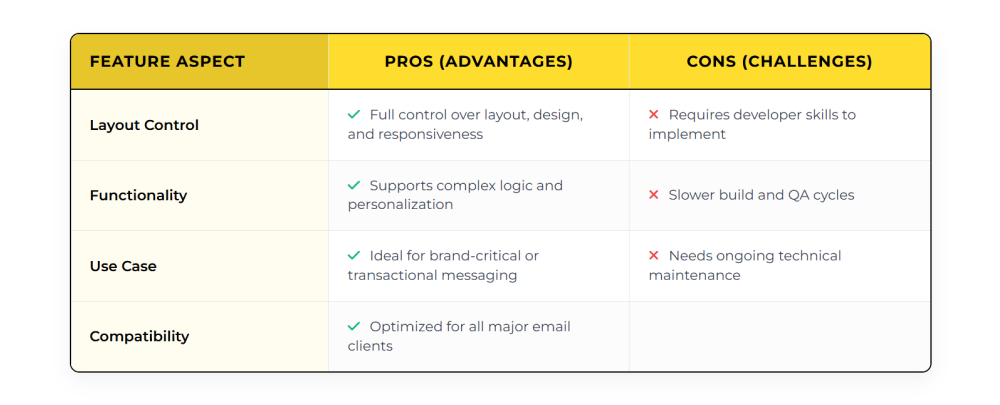
Also, here are a few best-fit use cases of custom-coded templates.
- Product launch or announcement campaigns
- Complex triggered sequences
- Transactional messages (order confirmations, billing alerts)
- Multi-region or multi-language programs
Email Mavlers’ expertise across multiple domains using Braze
Our team has executed Braze implementations across industries, such as:
- Healthcare – high compliance, high complexity
- Travel – time-sensitive journeys with geo-targeting
- Fashion – design-led custom Braze templates with seasonal rotation
Our approach to custom-coded Braze builds:
- Start from design files (Figma, Adobe XD, PDFs)
- Translate designs into email-optimized HTML + CSS
- Build dynamic emails using Braze Liquid personalization
- Test across 40+ client/inbox combinations
- Upload into Braze and QA every component
Emails that render beautifully, perform reliably, and scale efficiently across every lifecycle stage.
Once you have set aside your custom-coded scripts, it’s time to speed up the process.
Drag-and-drop editor for Braze ESP
Sometimes, speed matters more than polish.
The drag-and-drop editor in Braze lets marketers build emails without writing a single line of code.
These Braze email marketing templates are structured, visually striking, and built for agility.
Why teams love it?
- Rapid iteration and deployment
- No technical bottlenecks
- Easy for CRM teams and marketers to manage directly
Typical modules include:
- Text blocks
- Images
- Buttons
- Dividers/spacers
- Social media icons
Each block is editable and styleable, allowing marketers to assemble polished emails on the fly.
How drag-and-drop emails work in Braze
Building in the visual editor is simple:
Step 1: Open the Editor
- Go to Messages → Create Email → Drag-and-Drop Email
Step 2: Add Content Blocks
- Drag text, image, or button blocks onto the canvas
- Arrange sections as needed
Step 3: Customize Each Block
- Edit text, adjust colors, tweak padding, and spacing
- Add Liquid tags for personalization (e.g., {{first_name}})
- Define fallback values to avoid blank fields
Step 4: Preview and Test
- Toggle between desktop and mobile views
- Run test sends to check rendering and personalization
In under an hour, you can have a clean, effective email in-market, without a dev handoff.
Pros, cons, and use cases for drag-and-drop emails
Here is a tabular representation of the drag-and-drop emails.

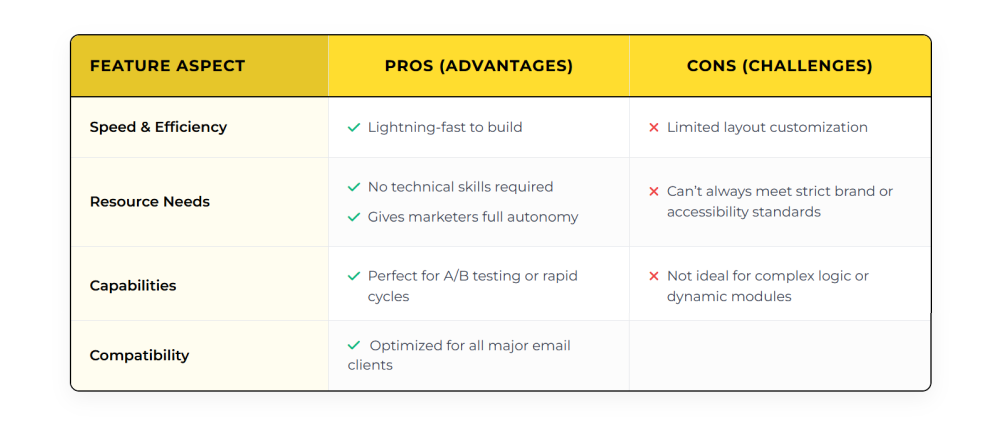
Also, here are a few best-fit use cases of drag-and-drop emails.
- Promotions or flash sales
- Event reminders or newsletters
- Simple lifecycle messages
- Teams without dev support
Now, let’s look at a quick recap of the key differences between drag and drop and custom-coded emails in Braze.


Drag-and-drop vs custom-coded emails in Braze
Here are a few key comparison areas.

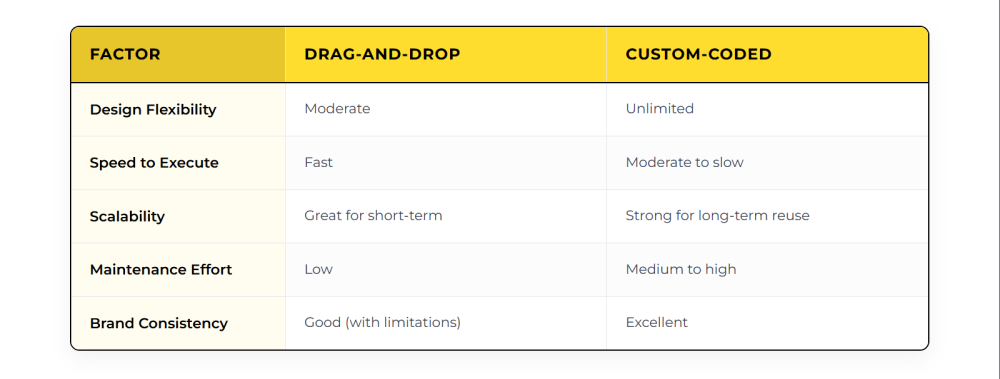
Choosing the right path:
- Use drag-and-drop for fast-moving campaigns and smaller teams.
- Use custom-coded for brand-critical or long-term lifecycle messaging.
- Or follow what many modern teams do – use both.
It’s not about either/or. It’s about choosing what fits this campaign, this time.
Choosing flexibility over rigidity in Braze email execution is the need of the hour.
Wrapping up
That brings us to the business end of this article, where it’s fair to say that rigid templates don’t keep up with agile growth.
Braze offers the tools. What matters is how you use them. Whether you need granular control with custom-coded HTML or speed with drag-and-drop blocks, your execution model should match your business reality.
At Email Mavlers, we support brands across both modes, helping them make smart choices, scale responsibly, and stay flexible.
Because the most effective Braze programs aren’t built on rigid templates. They’re built on adaptability, expertise, and choice.
Need help optimizing your Braze email execution model?
Let’s talk. Our team can build, test, and deploy your next email engine, your way.