


Personalization is no longer just first names. It’s showing relevant products, adjusting offers by location, triggering messages based on customer behavior, displaying real-time inventory or weather, personalizing with AI, and much more.
Modern email platforms support personalization, but to different levels. Each platform has its own syntax, templating language, and approach to building dynamic content in emails. And if you’re choosing an ESP or refining your email strategy, these differences matter way more than you might think.
We tested five major platforms side by side with an identical personalized email template to show you exactly how they handle personalization differently, and where each one hits its limits. So let’s get started.
Comparing personalization pattern execution across five popular email platforms
To understand real-world platform differences, we created one responsive HTML email template with the following personalization elements:
- Personalized greeting with customer name
- Conditional content (shown only to specific segments)
- Dynamic product recommendations
- Real-time loyalty points display
- Smart call-to-action buttons
- Dark mode compatible code


The above personalized email template was tested using desktop preview, mobile preview, test sends, Email on Acid rendering tests, and email clients including Gmail, Outlook, Apple Mail, Yahoo Mail, and mobile clients to ensure consistency. Only the personalization syntax and dynamic logic changed; the core design stayed identical.
The email platforms/ Email Service Providers (ESPs) covered:
- Braze
- HubSpot
- Marketo
- Mailchimp
- Salesforce Marketing Cloud (SFMC)

Breaking down each platform
1. Mailchimp – perfect for getting started
Personalization syntax:
Hi *|FNAME|*,
We have products just for you...
When to use:
- Running a small business or e-commerce store
- You want personalization without technical complexity
- Budget-conscious teams just beginning their journey
What works well:
- Simple merge tags (*|FNAME|*, *|COMPANY|*)
- Basic IF/ELSE conditional logic
- Easy-to-use visual editor
- Affordable pricing
The limitation: Mailchimp handles basic personalization beautifully, but it doesn’t support live API calls during email rendering. If you need real-time inventory updates or live pricing, you’re limited.
Personalization features supported:
- ✔ Purchase history
- ✔ Cart abandonment
- ✔ Email engagement history
- ✔ Basic segmentation
- ✗ Real-time external data

2. HubSpot – the balanced choice
Personalization syntax:
Hi {{ contact.firstname }},
{% if contact.lifecycle_stage == "customer" %}
  Your exclusive member offer
{% endif %}
When to use:
- You already use HubSpot CRM
- Your team wants personalization without heavy coding
- You need to connect email to your sales pipeline
What works well:
- Native CRM integration—everything flows from your contact database
- Clean, intuitive interface
- Good conditional logic for most use cases
- Excellent for nurturing and lifecycle marketing
The limitation: HubSpot personalizes based on what’s in your CRM. If you need real-time external data (like live weather or current inventory from a different system), you’ll need custom workarounds.
Personalization features supported:
- ✔ Contact and company properties
- ✔ Purchase and browsing history
- ✔ Website activity
- ✔ Deal stage
- ✔ Email engagement
- ✗ Live API calls
- ✗ Advanced scripting
3. Marketo – The B2B powerhouse
Personalization Syntax:
Hi {{lead.First Name}},
#if($lead.City == "San Jose")
  Check out our local event on Friday
#end
When to use:
- Your business is B2B with complex sales cycles
- You manage multiple campaigns across teams
- You need advanced lead scoring and nurturing
What works well:
- Velocity scripting for complex logic (loops, objects, conditionals)
- Excellent segmentation and automation
- Powerful account-based marketing capabilities
- Strong API ecosystem
The limitation: Velocity scripting is powerful but requires developer expertise. Setting up advanced personalization often means coding. Like HubSpot, real-time external data requires extra setup.
Personalization features supported:
- ✔ Lead properties and tokens
- ✔ Program-level personalization
- ✔ Complex conditional logic
- ✔ Behavioral data
- ✔ Smart campaigns
- ✗ Limited real-time APIs

4. Braze – real-time personalization leader
Personalization syntax:
Hi {{${first_name}}},

{% if ${city} == 'San Jose' %}
  Real-time weather updates available
{% endif %}

{% connected_content https://api.example.com/inventory %}
When to use:
- You need real-time, event-triggered personalization
- Your customers use mobile apps or web
- You want omnichannel experiences (email, SMS, push notifications)
- You’re a digital-first brand
What works well:
- Connected Content fetches live data during email rendering (inventory, weather, pricing)
- Excellent journey personalization
- Strong AI-powered recommendations
- Real-time event triggering
- Flexible Liquid templating language
The limitation: Braze requires technical expertise. Setting up Connected Content and advanced personalization isn’t point-and-click. It’s the most powerful but has the steepest learning curve in the group.
Personalization features supported:
- ✔ All behavioral data
- ✔ Real-time API calls
- ✔ Live inventory and pricing
- ✔ Current weather
- ✔ Loyalty balances
- ✔ Advanced conditional logic
- ✔ JSON data support
- ✔ Cross-channel personalization
5. Salesforce Marketing Cloud (SFMC) – the enterprise champion
Personalization syntax:
Hi %%FirstName%%
%%[ IF @Tier == "Platinum" THEN ]%%
Exclusive offer for Platinum members

%%[ ENDIF ]%%
Lookup("Customers","City","SubscriberKey",_SubscriberKey)
When to use:
- You’re an enterprise with massive customer databases
- You need unlimited flexibility and power
- You already use Salesforce CRM
- You have developers on your team
What works well:
- AMPscript is the most powerful personalization language (loops, lookups, SQL queries, API calls)
- Einstein AI for predictive personalization
- Deep Salesforce integration
- Unlimited customization possibilities
- Server-side JavaScript for advanced logic
The limitation: SFMC is overkill for small teams. It has a steep learning curve and requires serious technical expertise. If you don’t need enterprise-scale features, simpler platforms might be faster to implement.
Personalization features supported:
- ✔ Everything—no limits
- ✔ Real-time API calls
- ✔ Database lookups
- ✔ SQL queries
- ✔ Advanced scripting
- ✔ AI-powered recommendations
- ✔ Unlimited conditional logic
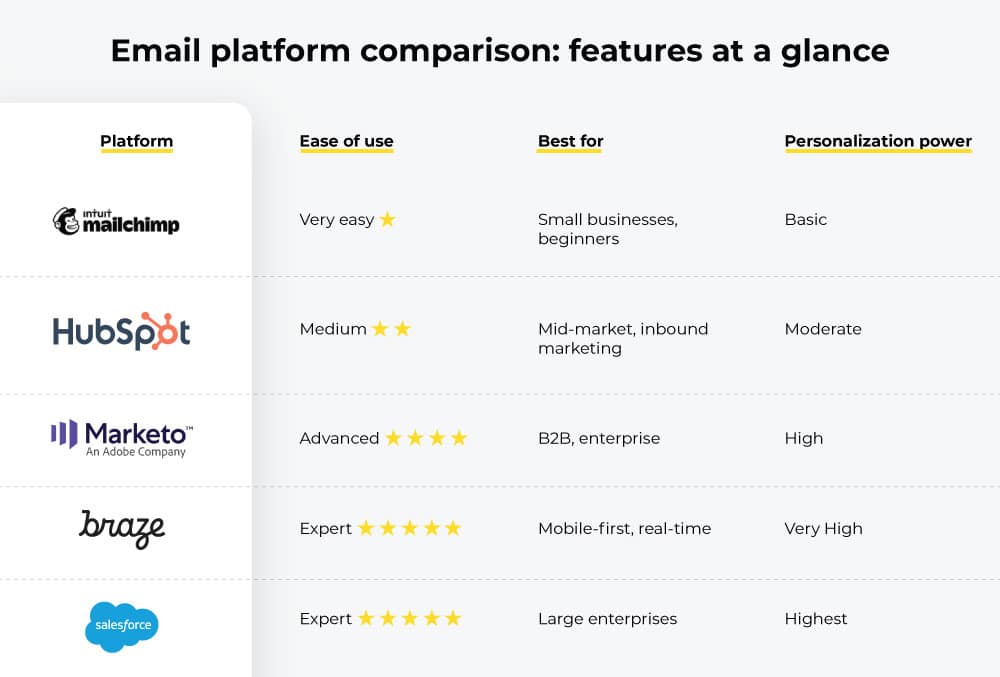
A comparison snapshot


What this means for your team
If you’re just starting out
Choose Mailchimp. Personalization shouldn’t be an obstacle to sending better emails. Merge tags and simple conditions are enough to dramatically improve engagement.
If you use HubSpot (or want to)
You already have what you need. HubSpot’s personalization is excellent for most marketing teams. Your customer data is already organized; just connect it to your personalized email templates. No developers required.
If you’re heavy on B2B marketing
Marketo is your sweet spot. The complexity pays off when you’re nurturing leads through long, complex journeys. Your developers will appreciate Velocity scripting, and your marketers will love the automation.
If real-time personalization matters
Braze is the clear winner. If you’re personalizing based on what’s happening right now (inventory, weather, live pricing), Braze’s Connected Content is built for this. The learning curve is steep, but the results are worth it.
If you need everything
SFMC delivers unlimited power. If you’re an enterprise with complex requirements, massive volumes, and strong technical teams, SFMC removes all constraints. Cost and complexity are high, but so is capability.
Final word
Email personalization has evolved from “add the customer’s name” to “deliver exactly what they need, right now.” The platform you choose should match your team’s expertise, your budget, and your ambitions.
The right platform isn’t always the most powerful; it’s the one that fits your team and grows with you. Need support with creating personalized email templates in your platform? Email Mavlers’ team of 150+ email experts knows 50+ platforms inside out and can help you leverage their template personalization capabilities.