


Google search changes daily. Social media reach is erratic. Between zero-click search, generative engine optimization (GEO), and taut privacy policies, the slice of traffic landing on your site is shrinking and the data is thinning. Organic search still fuels 53% of visits, but when platforms pull the rug out from under you, you have to double down on the channels you own.
Email remains the most powerful owned channel for building direct, durable connections.
But, like all channels, email template design trends change often.
And in the age of email overwhelm, as technological advancements and expectations around email design evolve rapidly, it’s essential to serve your audience with modern email template designs.
Email design trends in 2025 paraded trends like interactivity, unique layouts, custom typography, dark mode, accessibility. We also saw the rise of 360°-Rotate and image personalization.
And in 2026, the future of email templates is being molded by predictive AI and hyper-personalization. Next-gen email templates are fluid, responsive experiences. We are seeing a massive shift toward dynamic email templates that adapt content in real-time and AI-powered email templates that automate personalization at scale.
At Email Mavlers, we’ve analyzed the shifting landscape to help you prioritize. Here is how email template design trends are evolving in 2026 and how teams can use them to prepare for the next gen email design needs.
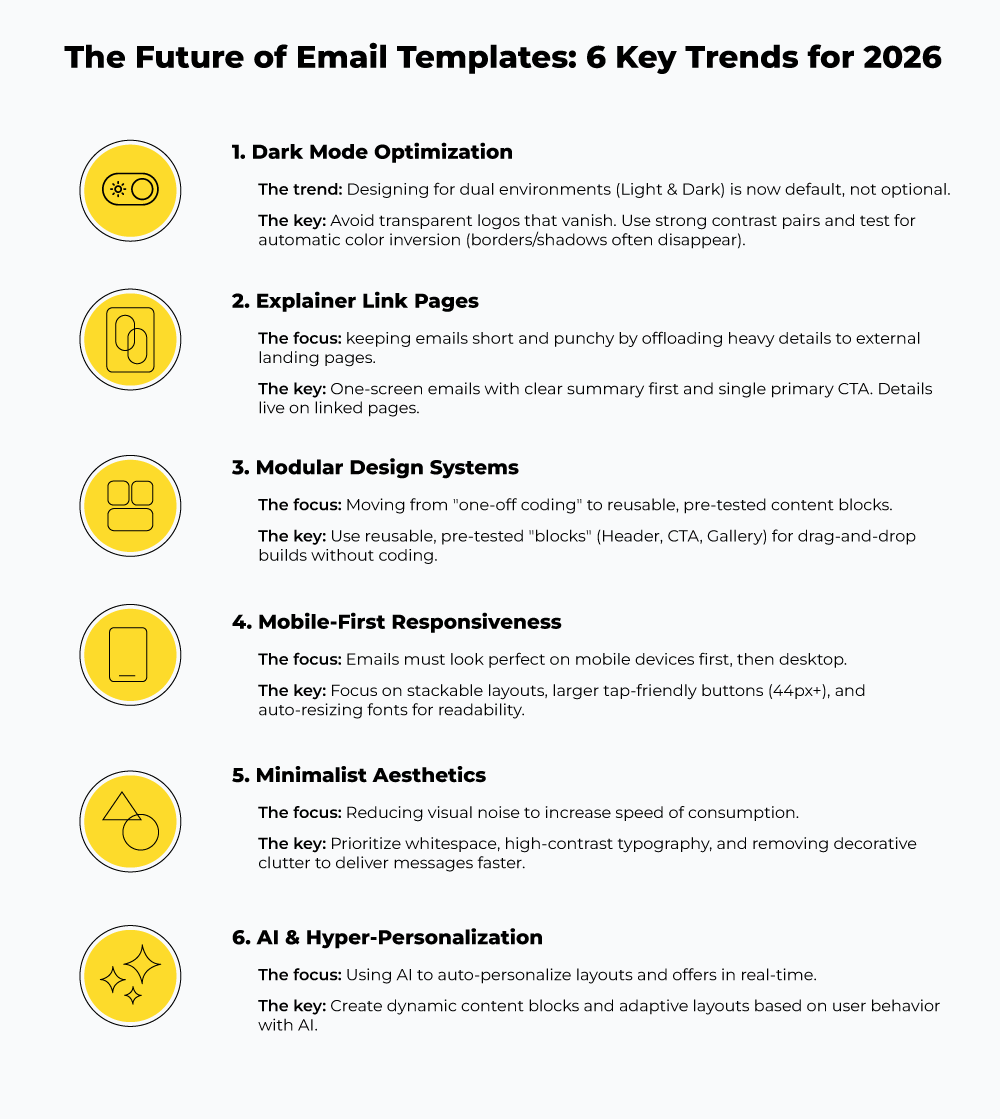
1. Dark Mode Awareness and Its Real Limitations
We have long been encouraging Dark Mode email design for better readability and user experience in dimly lit and nighttime settings. Of course, dark mode effectiveness is context-dependent. Yet, it reduces screen glare and extends battery life, making it a table-stakes for modern email template design.
In fact, Dark Mode is now a default setting across mobile and desktop devices. It also impacts your email branding by adjusting the HTML used to render it in the inbox.
User adoption is also a driving force here. Litmus reports that email opens in dark mode rose to 35% in 2022.
When templates aren’t designed with that reality in mind, you risk email readability and brand consistency for hard-to-read text, inconsistent colors that break your brand styles, and other design issues.
That said, Dark Mode isn’t free from limitations that designers and developers must understand. There is a misconception that simple color inversion, toggling between black and white, suffices. That’s just a broad stroke. True optimization requires much more than simple inversion.
When you simply invert a light theme, you destroy the visual hierarchy. Distant surfaces become light; near surfaces become dark. The “physicality” of the design breaks, and the user interface feels unnatural.
Worse, you are fighting the email clients that apply their own Dark Mode logic. Gmail, Outlook, Apple Mail, and Android all manifest color transformations differently.
In an earlier Email Mavlers article, we explained Dark Mode Email Design: Challenges & How to Overcome Them in detail. Here’s a quick rundown of the dark side of the dark mode in email template designs.
What actually goes wrong in Dark Mode :
- Color inversion: Many clients automatically flip light colors to dark and dark to light. The result often distorts the intended design.
- Text readability issues: Low-contrast text can become too faint or too bright. The resulting design makes the content tough on readers’ eyes.
- Logos/images disappearing: Transparent or single-color logos may blend with dark backgrounds.
- Button visibility issues: CTA colors may invert incorrectly. The limited visibility of CTAs also impacts click-through rates.
- Borders and shadows vanish: Subtle elements often don’t survive color flipping. This leaves your layout looking flat and unstructured.
- Client inconsistency: Gmail, Outlook, Apple Mail, Android — all have their proprietary algorithm to interpret and apply Dark Mode settings.
- Text Strain: Pure white text on a pure black background creates excessive contrast (halation) that’s discomforting during extended use and causes eye strain rather than preventing it.
Why this matters for the future:
That’s why, for brands planning to create email templates in 2026, future email templates must be built with dual environments in mind. This means:
- Preparing alternate logo versions
- Using strong contrast pairs
- Avoiding unnecessary transparency
- Designing with clear foreground–background separation.

2. Explainer Link Pages: The Solution for Long Email Threads
Nine seconds. That’s the average time a user spends looking at an email, according to Litmus. In that window, a wall of text is ineffective, rather it’s a deterrent. Most readers archive the message with a mental note to “read it later,” which usually means never.
What brands used to do—cramming every detail into a single email—is now an engagement and deliverability killer.
The solution emerging in next-gen email templates is the explainer link: razor-thin emails that point to meaty explainer pages.
How it works in email template design:
- The email delivers a short, high-level summary
- One clear CTA points to an explainer page
- The page holds the depth: details, screenshots, steps, FAQs, and updates
Beyond respecting the reader’s time, explainer links solve another problem: version control.
Traditional emails are static. Once sent, you can’t fix a typo or update a step in a tutorial. A link-based structure changes that. The content remains on a dynamic page, giving teams the flexibility to update FAQs, screenshots, and copy long after the campaigns have launched.
Why this email template trend is growing:
- Emails stay short and readable.
- Updates happen on the page, not in the inbox.
- Readers choose when to engage with long content.
- Communication feels cleaner and more professional—especially for announcements, product updates, and technical threads.
Explainer links keep emails simple without stripping away depth. And that balance is why they’re becoming a core pattern in modern email template design.
3. Modular & In-Built Email Systems
The era of the “artisanal” email is over.
For years, teams treated every campaign as a unique project, hand-coding HTML from scratch. That workflow no longer matches the volume of modern email marketing demands.
Email teams are moving away from one-off builds. We are moving toward an ‘Email Design System’ model: a reusable, modular architecture built to scale with enterprise needs.”
A modular design system is a library of pre-tested, reusable components that we know are tested well. So that there is no need to design around and waste our creative energy every time we want a new email template. We just need to assemble those modules into production-ready templates.
This email template trend decouples marketing from development. Marketers can build complex layouts without touching a line of code, and developers only need to intervene when creating new modules, not new emails. If you need to update a footer, you fix the module once, and the change propagates globally.
What’s enabling the shift
- In-built ESP editors are getting smarter
This modular approach is being accelerated by a massive upgrade in Email Service Provider (ESP) capabilities. The legacy in-built editors of the past were clunky and unreliable. Conversely, contemporary solutions have evolved into high-performance design ecosystems.
- Real-Time Rendering
Modern ESPs now offer live previews that accurately simulate mobile stacking and dark mode inversion as you edit, removing the guesswork.
- Guardrails, Not Just Canvases
New tools include automated contrast checkers and “dark-mode-safe” image settings, acting as an automated QA layer that prevents broken designs from ever leaving the draft folder.
- Less fragile responsiveness
We are seeing fewer layout breaks on small screens because ESPs have improved their underlying rendering engines to handle font resizing and column stacking automatically.
Taken together, these changes steer in one direction. The next generation of email templates won’t be handcrafted assets. They’ll be flexible systems. Built once, reused much, and designed to adapt as inbox environments keep changing.
Dig deep into modular email templates with our blogs:
- A Practical Guide to Building Dynamic Modular Email Templates
- High Production Time? Ship Faster with Modular Email Templates!
4. Mobile-First, Fully Responsive Email Templates
Mobile is no longer a secondary consideration in email design. It’s the primary environment.
According to Forbes Advisor, 41% of email views now occur on mobile devices, yet 42% of users will immediately delete messages that fail to display correctly on smaller screens. As 2026 marks the point where mobile engagement finally matches desktop levels, the justification for desktop-centric design has effectively disappeared.
The performance gap is already visible. Brands that invest in mobile-first optimization see higher engagement, stronger click-through rates, and fewer deletions. When the email experience works on a phone, users don’t just read more—they act more.
This matters even more in e-commerce. A mobile-first approach to transactional and promotional emails removes the structural barriers that come in the way of the journey from engagement to purchase.
This shifts the email template design baseline. Responsive behavior can’t be bolted on at the end. Templates need to be built for constrained screens from the start.
Where mobile-first design is heading:
- Layouts that stack cleanly without breaking hierarchy.
- Large, tap-friendly CTAs built for thumbs, not cursors.
- Simple, legible typography at small sizes.
- Shorter content blocks optimized for scanning.
- Lightweight images tuned for speed and data usage.
- Seamless rendering across light and dark modes.
The goal of modern email template design is to remove every possible barrier between the “Open” and the “Buy.” As we look toward 2026, the inbox will become even more integrated with mobile wallets and one-tap checkouts. If your template isn’t built for that speed, it’s outdated and invisible.
5. Smarter, Cleaner, More Minimal Designs
For years, email strategy followed a “junk drawer” philosophy: the more links, images, and CTAs we crammed into a layout, the better our chances of catching a click. We were wrong. In an era of inbox overwhelm, maximalism doesn’t capture attention, it causes a bounce.
The future of email templates belongs to the “Oasis of Calm”—minimalist designs that strip away the decorative and double down on the essential.
This shift in modern email template design has a dual role– an aesthetic choice as well as a direct response to decision fatigue. When you give a subscriber five things to do, they often choose to do nothing.
AI-assisted content generation is accelerating this trend. When a copy can be generated, tested, and refined faster, there’s less incentive to overload a single send.
Current email template design trends are moving toward this minimalism through several tactics:
- Fewer decorative elements competing for attention.
- White space as a structural tool. It creates a natural flow that forces the eye toward the most critical message.
- A limited palette of 2–3 colors with a “pop” of color for a button.
- bold, clean typography to deliver the message.
- Balanced text-to-image ratios.
- One CTA that focuses on one primary action
6. Automation, Personalization, and AI-Driven Content
The future of email templates lies in AI-powered email templates that don’t just display data, but actually “think” about the recipient in real-time.
Email templates are becoming adaptive. Behaviorally responsive. The core of these modern email template designs is the dynamic content block. These are sections of your template that remain empty until the moment of open, at which point an AI engine populates them based on the user’s current context.
That shift turns templates into frameworks. Product blocks update dynamically. Offers adjust in real time. Layouts respond to preferences instead of staying fixed. Testing happens continuously, not campaign by campaign.
Common use cases are already in motion:
- Product recommendations generated automatically.
- Offers personalized at send or open time.
- Layouts adjusted by device, behavior, or segment.
- A/B variations created and tested without manual setup
Generative AI has accelerated this transition. Many email teams already use it for day-to-day production—subject lines, preview text, copy drafts, image generation, and multi-email sequences.
The real impact isn’t just faster writing. It’s a faster iteration. AI:
- Shortens production cycles
- Supports deeper segmentation,
- Makes personalization practical at scale.
What used to require multiple campaigns can now live inside a single dynamic template.
By 2026, this won’t be an advanced capability. It will be standard operating practice.
The road ahead
The future of email templates isn’t found in a single feature, it’s found in a shift of philosophy.
We are moving away from the email as a static, “one-size-fits-all” flyer and toward the email as a living, responsive application. Whether it’s the structural efficiency of modular systems, the mobile-first design, or the predictive intelligence of AI-driven content, the goal is the same: reducing the friction between the brand and the subscriber.
At Email Mavlers, we spend our time in the weeds of these shifting standards so you don’t have to. We’re committed to helping senders navigate this evolution with clarity and confidence.
Ready to modernize your email template design strategy? Don’t wait—begin assessing your templates today. Focus on the innovations that best fit your brand and scale from there. To stay at the forefront of email design, dive into our resources or join our community via the newsletter.
Reach out to our experts for an email design consultation.

Drashti Vayeda


Urja Patel